Building apex: An Internal Developer Platform Designed for Humans and AI Agents Alike
Some projects start from pain. This one started from fascination.
I kept finding myself drawn to the idea of what an internal developer platform actually is — a single, coherent interface between a developer and all the infrastructure they depend on. There is something genuinely interesting about this problem: how do you design a platform where adding a new capability feels like a natural extension rather than bolting something on? How do you build something that is governed by policy, auditable by default, and extensible without becoming a framework trap?
So I built apex. Not to ship it to anyone. Not to prove anything. But because the joy is in thinking through the problem properly and building something that takes it seriously.
This post walks through the design, the reasoning behind every significant decision, and what I think is the most interesting angle of the project: apex is built from the start to serve not just developers, but AI agents — equally, and without any special-casing.
What Problem Does an Internal Developer Platform Solve?
Before getting into the implementation, it is worth being precise about the problem.
The typical developer experience in an infrastructure-heavy environment looks something like this: you need to trigger a CI build, so you open Jenkins, navigate to the right folder, find the job, fill in the parameters, and click build. To check the logs, you go back and click through again. To deploy, you switch to a different tool — maybe ArgoCD, maybe a custom deploy script. To check if the deployment is healthy, you switch to your Kubernetes dashboard or run kubectl directly. To look up a secret your service needs, you go to Vault. To assume an AWS role for a quick infrastructure check, you remember which account ID maps to which environment.
None of this is impossible. It is just friction — accumulated, repeated, context-switching friction. And friction is not neutral. It slows debugging. It creates inconsistency. It leads teams to build ad-hoc scripts, Slack bots, and runbooks that each embed slightly different assumptions about how things work.
An Internal Developer Platform (IDP) answers this with a different model: one interface, one auth model, consistent error messages, auditable access, and automation-ready output. You type apex ci build platform/services/deploy-api --param ENVIRONMENT=dev and the platform handles the protocol, the auth, the error shaping, and the audit trail. You type apex logs tail my-service --env prod and the platform knows how to reach your log backend, apply your authorization policy, and return exactly what you asked for.
But there is a second dimension to this problem that is increasingly relevant: the developer loop is no longer just human.
AI coding assistants — Windsurf, Cursor, Claude, GitHub Copilot — are no longer just autocomplete. They are agents that take actions: write code, run tests, read errors, and apply fixes. In this world, a platform tool that can only be used by a human at a terminal is already half of a solution. The agent needs access to the same infrastructure operations the developer has — with the same governance, the same audit trail, the same identity — to close the build-deploy-observe loop autonomously.
This is what apex is designed for.
Introducing apex
apex is organized as a monorepo implementing the foundation of an internal developer platform. It is not a framework, not a SaaS product, and not a toy example. It is a serious implementation of the idea.
The project is structured around these components:
api/— a FastAPI backend that is the single trust boundary for all platform operationscli/— a Typer CLI for human interactionmcp/— an MCP server that exposes platform operations as structured tools for AI agentspackages/contracts/— shared request/response models used by both API and CLIinfra/local/— a Docker-based local stack (Jenkins, OIDC provider, OPA, Postgres, OpenTelemetry collector)docs/— cross-cutting architecture, auth, integration, and operational guides
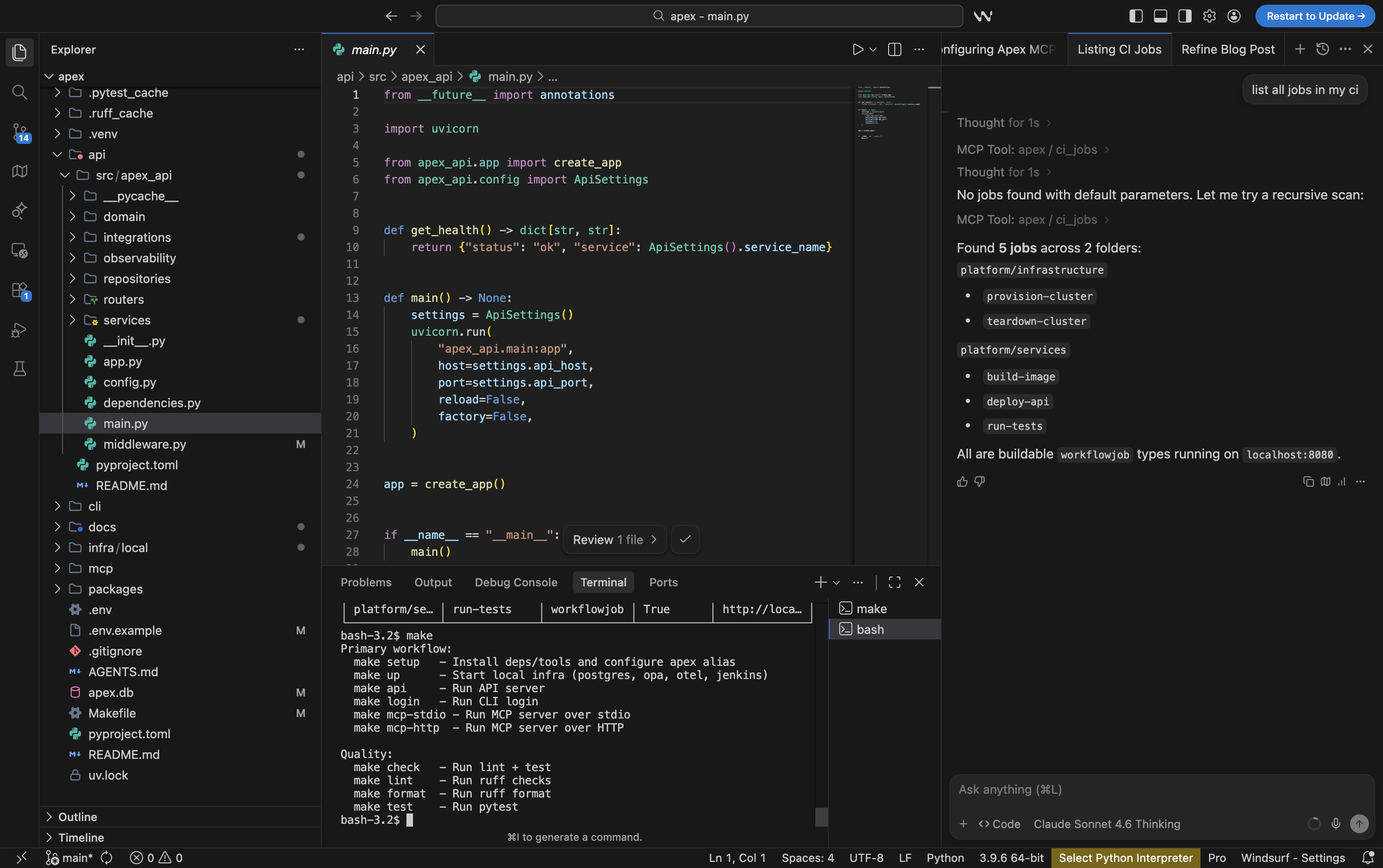
The guiding design question throughout was: what does a platform look like if you design it from the start to serve both humans and AI agents as equally first-class clients?
Every architectural decision flows from that question.
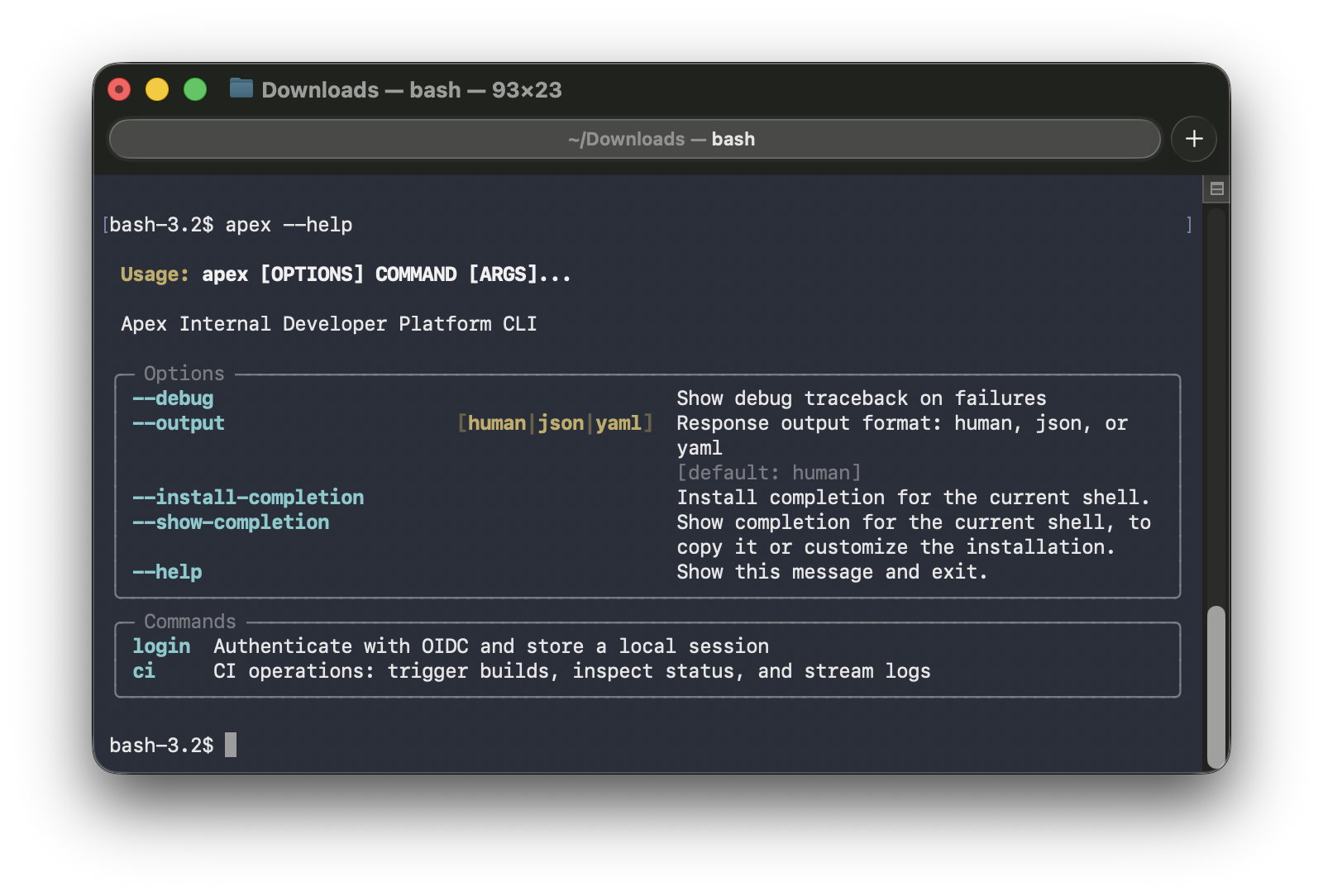
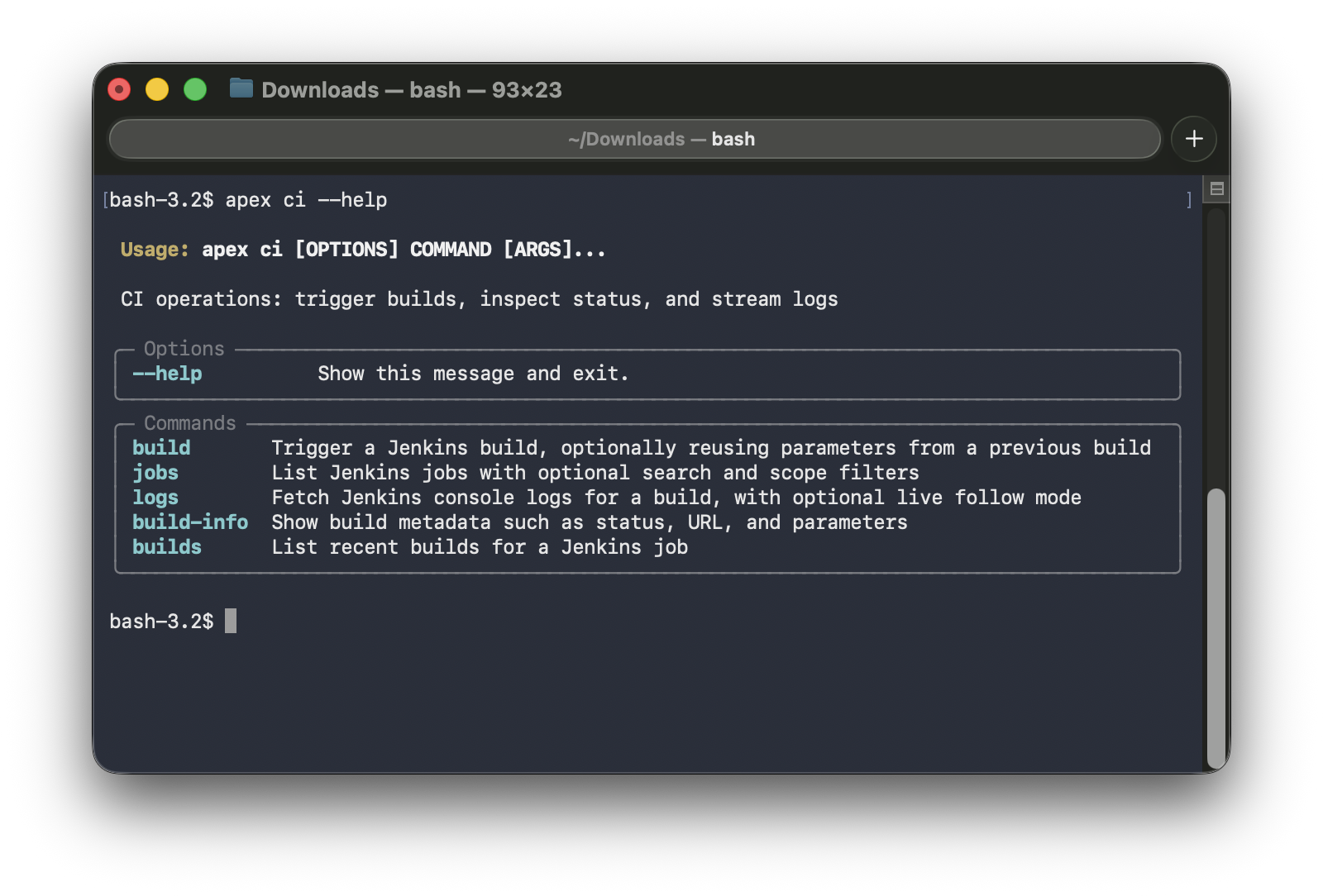
apex --help | apex ci --help |
|---|---|
 |  |
High-Level Architecture
The Client Surfaces
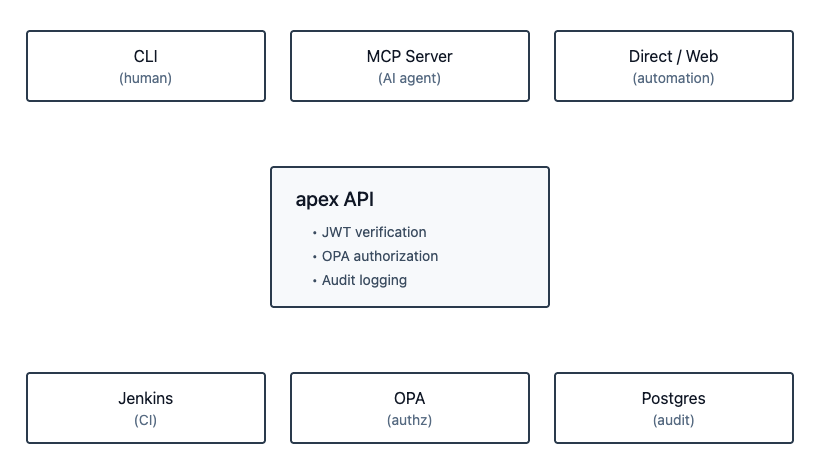
apex has multiple ways a caller can interact with it:
- CLI — the primary human interface; domain-grouped commands,
--output human|json|yaml,--debugmode - MCP server — the AI agent interface; structured tools with documented parameters and typed responses
- API directly — for automation, other services, or a future web UI
All three surfaces converge on the same place: the API. This is a deliberate, non-negotiable design choice.
The Single Trust Boundary
The API is where JWT verification happens, where OPA authorization is enforced, and where audit logs are written. No client surface bypasses this — not the CLI, not the MCP server. This matters because it means adding a new client (an AI agent, a web UI, another service) never requires re-implementing auth or authorization logic. You get it for free by going through the API.
Shared Contracts
packages/contracts holds the shared request and response models that both the API and CLI import. This is a small but important decision: it prevents the classic drift problem where the API adds a field, the CLI does not know about it, and you spend an afternoon debugging why something is missing.
The convention is: when adding a new domain, you start in contracts. Define the request shape and the response shape first. Then the API and CLI both implement against those definitions. The MCP server also uses the same response shapes when returning tool results to agents.
Why Each Architecture Choice Was Made
This section explains the reasoning behind the technology choices — not just what was picked, but why.
FastAPI
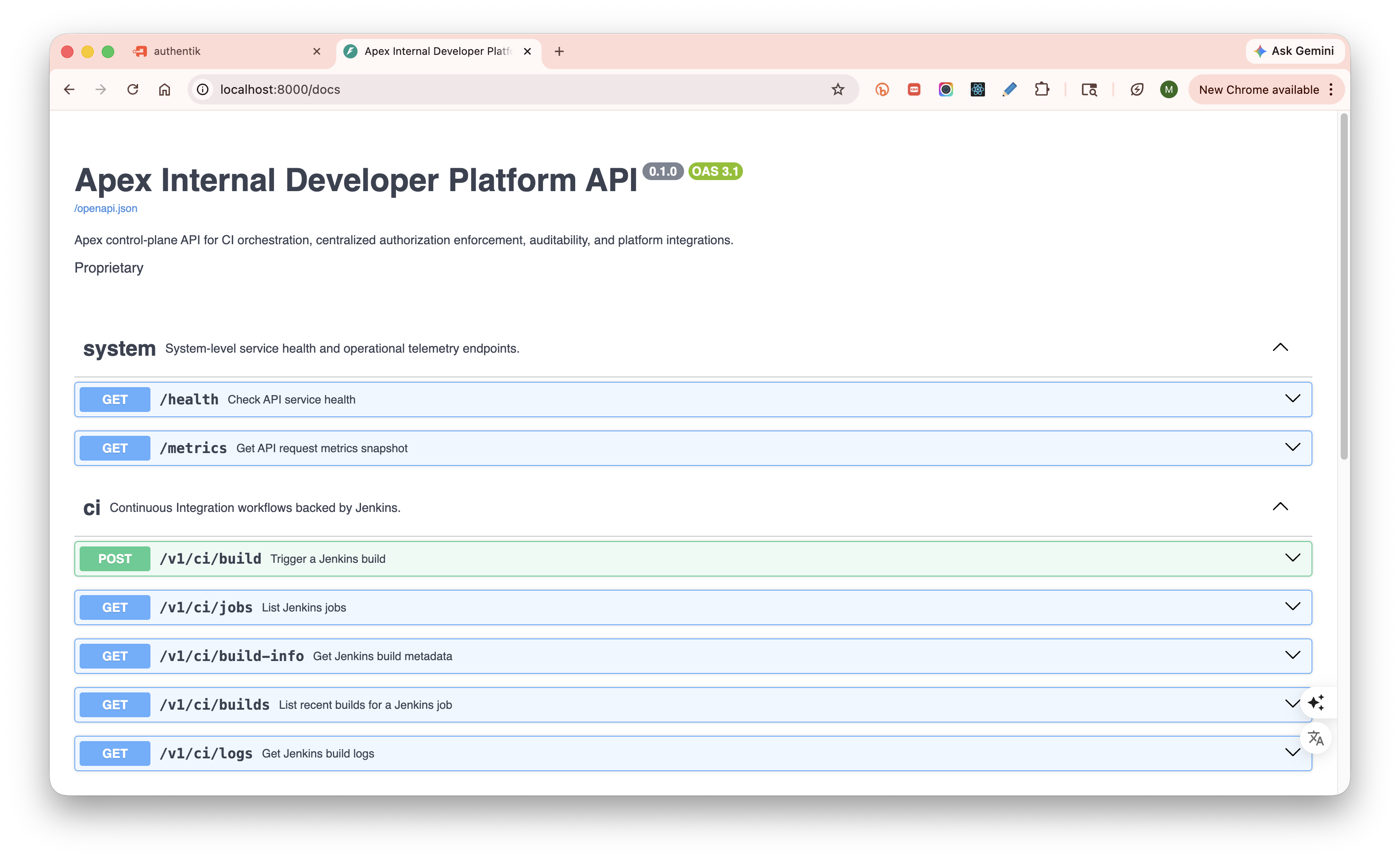
FastAPI generates production-grade OpenAPI documentation automatically from typed request and response models. Every endpoint in apex has explicit summary, description, tags, documented parameters with constraints and examples, and explicit response schemas. This is not just nice for human readers of /docs — it is essential for agents. An agent consuming a well-documented API gets reliable, structured contracts to reason about. A poorly documented API is noise.
FastAPI is also async-first, which matters for an integration-heavy platform where most operations involve waiting on external systems (Jenkins, OPA, Vault, Kubernetes).
Typer
Typer gives you composable command groups organized by domain. The apex ci group, the (future) apex deploy group, the apex clusters group — each is a self-contained module. Adding a new domain means adding a new file. No rewiring of the main entry point, no argparse boilerplate.
OPA (Open Policy Agent)
This is the authorization decision-maker. The reason for choosing OPA over embedded role checks in the service layer comes down to one principle: authorization logic should be outside your application code.
When authorization is embedded as if user.role == "admin" inside a service method, it is invisible to audits, hard to test in isolation, and scattered across the codebase. With OPA, the policy is a Rego file — version-controlled, testable with its own test harness, readable by security reviewers independently of the application code.
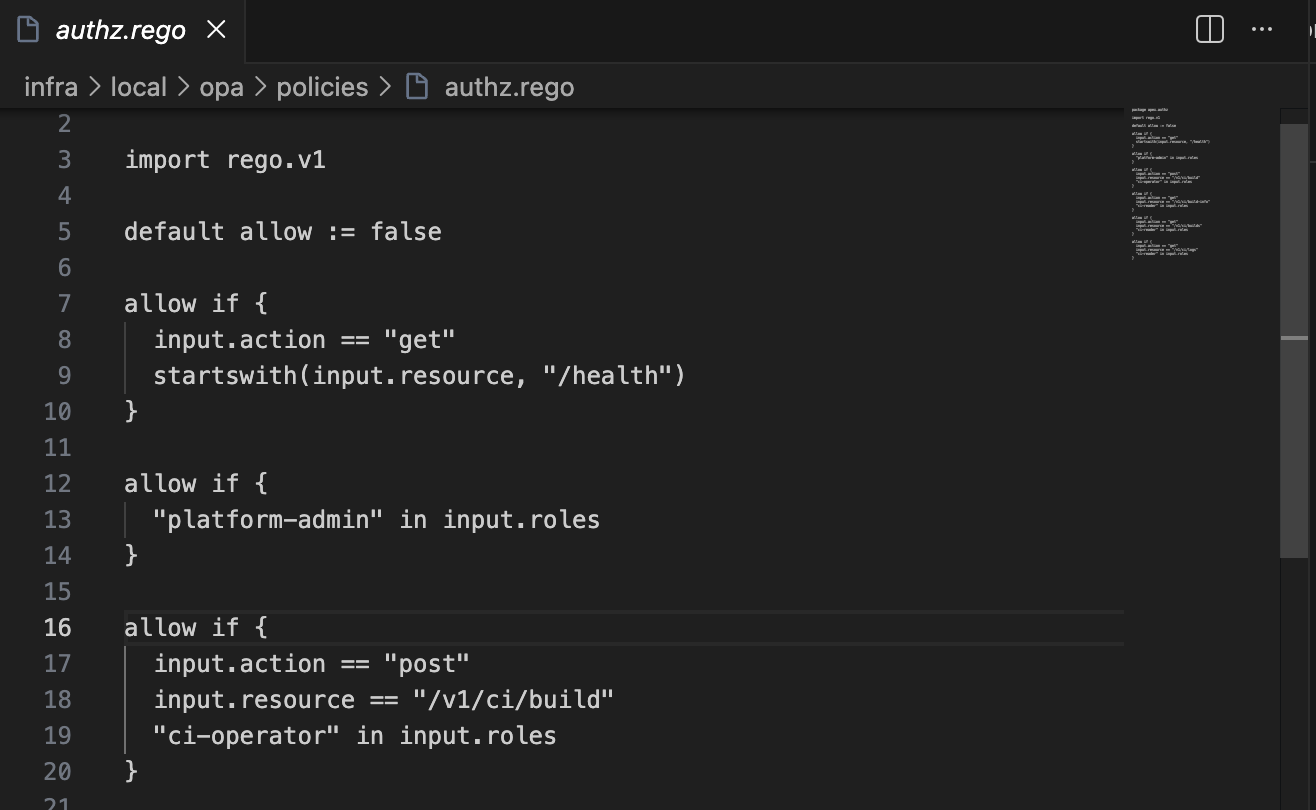
When a new domain is added to apex, the OPA policy is where you define who can do what in that domain. The enforcement happens automatically at the API middleware layer. The service code never sees unauthorized requests.
Critically, this applies uniformly whether the caller is a human using the CLI or an AI agent using the MCP server. The policy is the policy.
Shared Contracts
Worth restating as a design principle: the contract is the source of truth, not the implementation. New domains start in packages/contracts. API and CLI are both downstream consumers of those definitions. This forces the interface to be thought through before any implementation begins.
MCP (Model Context Protocol)
MCP is an open protocol for exposing tool interfaces to AI agents. It defines how an agent discovers what tools are available, what parameters they accept, and how to interpret responses.
The reason apex implements an MCP server rather than just saying “agents can call the REST API directly” is the difference between a designed interface and an improvised one. An agent calling a REST API has to deal with auth headers, HTTP status codes, error payloads, and response parsing — all of which require prompt engineering or custom code. An MCP tool gives the agent a structured, typed interface: name, description, parameters, response schema. The agent reasons about the tool definition, not the HTTP layer.
ci_logs Optimization for LLM Context
This is worth calling out specifically because it reflects a design decision that is only relevant in an agentic world.
When a human tails logs from a Jenkins build, they can scroll through thousands of lines and find what they need visually. When an AI agent reads logs, every token costs something — and a 10,000-line build log will either overflow the context window or dilute the signal. apex’s ci_logs MCP tool supports three reduction mechanisms: keyword filtering (case-insensitive contains match), tail_lines (last N lines of the log), and output truncation with next_start + more_logs_available metadata so the agent knows there is more and can request the next slice. The agent gets signal, not noise.
OpenTelemetry
The API is instrumented with OpenTelemetry-compatible traces, structured logs, and a metrics endpoint. The reason for choosing OpenTelemetry over a vendor SDK is simple: vendor-neutrality from day one. In any deployment, you can point the same collector at Jaeger, Grafana Tempo, Datadog, or Honeycomb without changing a line of application code.
uv
Modern Python tooling. uv manages the workspace (monorepo with multiple packages), installs dependencies fast, and keeps environments reproducible. The workspace-aware model means running any package from the repo root just works. For a multi-package monorepo, this is the right tool.
Authentication and Authorization Deep Dive
The Login Flow
apex login
  │
  ├── CLI starts local callback server
  ├── Opens browser to OIDC authorization URL (JumpCloud / Authentik locally)
  ├── User authenticates in browser
  ├── Browser redirects to callback with authorization code
  ├── CLI exchanges code for tokens using PKCE
  ├── access_token + refresh_token received
  ├── Tokens stored in OS keyring (encrypted local fallback)
  └── access_token written to ~/.config/apex/mcp-access-token.json
                                    (short-lived cache for MCP local auto-auth)
PKCE (Proof Key for Code Exchange) is used because the CLI is a public client — it cannot safely store a client secret. PKCE protects the authorization code exchange against interception without requiring a server-side secret.
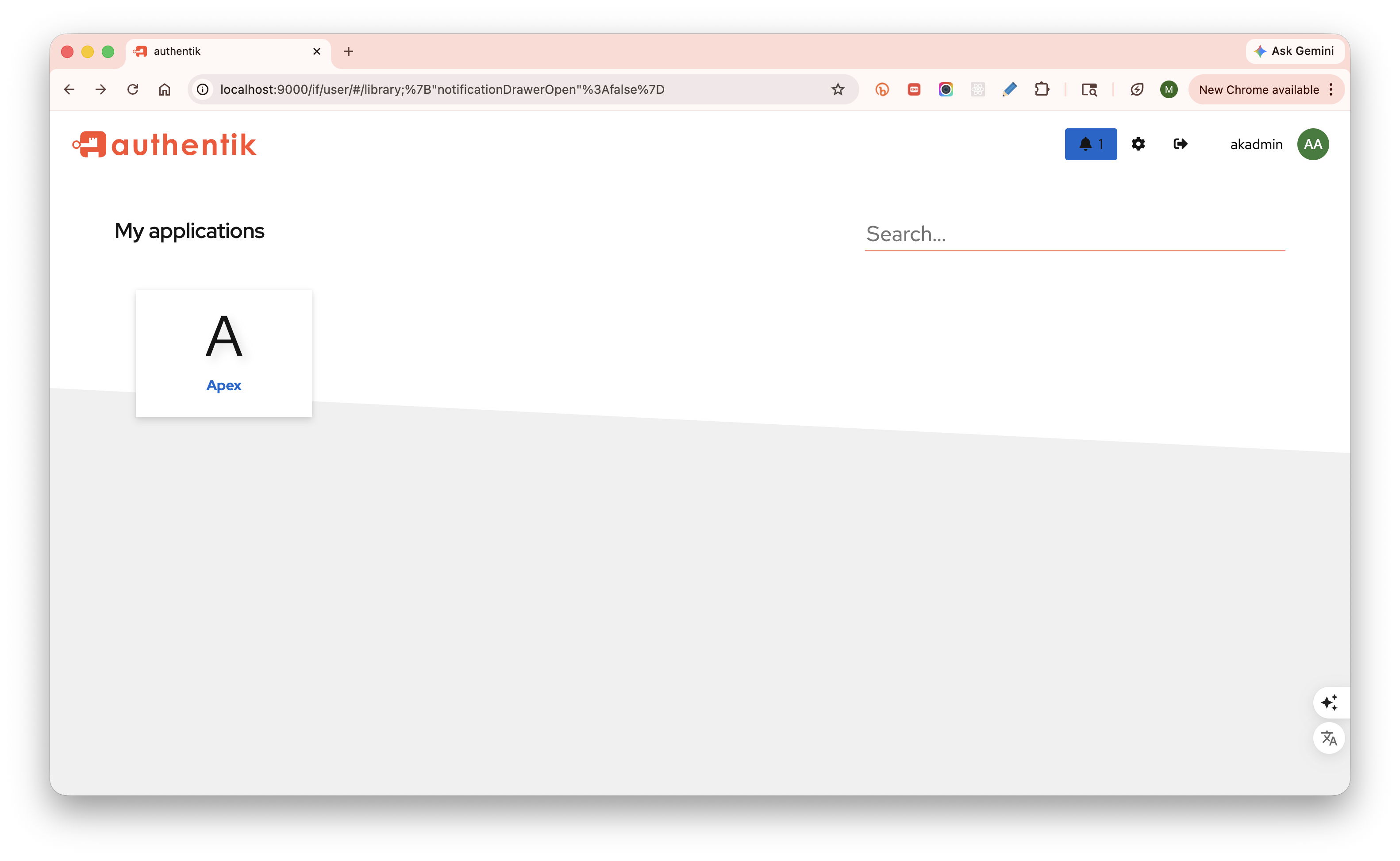
API Trust Model
The API does not trust anything the caller sends except the bearer token itself.
When a request arrives, the API extracts the bearer token, verifies the signature using the JWKS endpoint, validates the issuer and audience claims, and extracts the principal (sub) and roles from a configured claim. Only after this verification does the API construct the trusted identity object that is passed to OPA.
This means a caller cannot claim to be someone else by setting a header. The API is the verifier. Everything downstream of the API — services, integrations, repositories — works with already-verified identity.
OPA Authorization
After JWT verification, every API action goes through OPA:
API extracts verified identity
  │
  ├── Sends to OPA: { principal, roles, action, resource }
  ├── OPA evaluates Rego policy
  └── Returns: { allow: true/false }
The policy is code. It lives in the repo, is version-controlled alongside everything else, and can be tested independently. Adding a new domain to apex means adding a new policy block to OPA — not adding if statements inside service methods.
MCP Auth Passthrough — and Why It Matters for Agents
MCP does not hold credentials. It resolves the user’s token in priority order:
- explicit
tokenargument on the tool call Authorization: Bearer <token>in the MCP request headers- local CLI session cache at
~/.config/apex/mcp-access-token.json(written byapex login)
It then forwards that token as a bearer token to the API. The API verifies it, enforces OPA, logs the audit event — exactly as if the CLI had called it.
This has a concrete implication for agentic workflows: an AI agent using apex operates under the developer’s identity. The agent calls ci_build, OPA sees the developer’s username and groups, and allows or denies based on the same policy that applies to the developer at the CLI. There is no special agent account, no trust escalation, no shadow access path. The governance model does not have an exception for agents.
The CI Domain — Low-Level Flows
Why Jenkins as the First Integration
Jenkins is a deliberate first choice. It is not the most modern CI system, but it is representative of the real-world complexity a CI integration has to handle: parameterized builds, job folder hierarchies, queue-based build refs that resolve asynchronously, progressive log streaming, and rich job metadata. If the integration model works well for Jenkins, it will translate to other backends.
The Full Request Path
Here is what happens when you run:
apex ci build platform/services/deploy-api --param ENVIRONMENT=dev --param VERSION=1.4.2
- CLI parses the command, constructs a
BuildRequestcontract object frompackages/contracts - CLI POSTs to API
/v1/ci/buildwith the bearer token in the Authorization header - API router extracts the token, verifies it, constructs the trusted identity
- API router calls OPA — identity +
ci:buildaction +platform/services/deploy-apiresource → allow - API router delegates to CI service
- CI service calls the Jenkins integration — selects
buildorbuildWithParametersdepending on whether params are present - Jenkins returns a queue item location (e.g.
queue/123) - CI service records an audit log entry in Postgres (who, what, when, with which params)
- CI service sends a Slack notification if configured
- API router serializes the response using the shared contract schema and returns it
- CLI receives the response, renders it in
human,json, oryamlbased on--output
Rebuild Flow
apex ci build platform/services/deploy-api --rebuild queue:123 --param ENVIRONMENT=staging
--rebuild queue:123 tells the API to fetch the parameters from a prior build referenced by queue:123. The API resolves the queue ref to an actual build number, fetches its recorded parameters, and uses them as the base. Any explicit --param values in the current command override their matching keys from the prior build. This means you can re-run a broken build with one changed parameter without remembering every other value it was called with.
Log Following
apex ci logs platform/services/deploy-api --build queue:123 --follow
Log following works via cursor-based polling against Jenkins’ progressive text API. The API exposes a follow=true mode on /v1/ci/logs that returns a chunk of log text starting at a start byte offset, along with next_start (the next cursor position) and more_logs_available (a boolean indicating whether the build is still running and producing output). The CLI polls this endpoint, appending each chunk to the terminal output, until more_logs_available is false.
This is a good example of how a complex upstream behavior — Jenkins’ streaming log API — is abstracted behind a clean interface. The CLI does not know about Jenkins byte offsets. It calls the API, receives structured progress metadata, and knows what to do next.
Error Handling
If Jenkins is unavailable or misconfigured, CI endpoints return 502 Bad Gateway — not a 500, not an opaque error. The distinction matters: 4xx means the client did something wrong, 5xx means the server or an upstream dependency failed. 502 specifically signals that the upstream integration is the failure point. The API never forwards raw upstream payloads (like Jenkins’ HTML error pages) to the client. It shapes them into structured, actionable error responses.
apex as an Agentic Platform
This is the section I find most interesting — not because it is the most technically complex, but because it reflects a question that I think is genuinely important right now: what does “first-class” developer experience mean when the developer is sometimes an AI agent?
The Shift
AI coding assistants have crossed a threshold. They are no longer just code suggestion engines — they are agents that take actions: write files, run terminal commands, call APIs, read results, iterate. In an IDE like Windsurf or Cursor, an agent can be given a task and execute a multi-step workflow autonomously.
This changes what a developer platform needs to be. If your platform tools only work via a human-operated CLI, the agent has to either simulate a terminal session (fragile, unstructured) or call the raw API with ad-hoc HTTP knowledge (no type safety, no discovery, no consistent error model). Neither is first-class.
First-class agent access means: structured tool definitions, typed parameters, predictable response shapes, context-optimized output, and identity-preserving auth. That is what the MCP server in apex provides.
What Is MCP?
Model Context Protocol (MCP) is an open standard for exposing tools to AI agents. An MCP server declares a set of tools — each with a name, description, parameter schema, and expected response shape. An AI agent (or the IDE hosting it) can discover these tools, understand what they do from their descriptions, invoke them with structured arguments, and interpret the typed response.
The key difference from just calling a REST API: the agent is working with a designed interface, not reverse-engineering an HTTP spec. The tool description tells the agent when to use it, the parameter schema tells it what to send, and the response shape tells it what to expect back.
What apex Exposes via MCP
apex’s MCP server currently exposes the full CI domain:
| Tool | What It Does |
|---|---|
ci_jobs | Discover Jenkins jobs with optional query/folder/buildable filters |
ci_build | Trigger a build with parameters; supports rebuild from prior build ref |
ci_builds | List recent builds for a job with their status |
ci_build_info | Get metadata for a specific build (resolves queue refs) |
ci_logs | Fetch build console output with keyword filter, tail_lines, and truncation |
The Full Agentic Loop
Here is the complete workflow an AI agent can execute autonomously using apex MCP tools:
Developer: "Fix the failing tests in the auth module and get the build green."

Agent:
  1. Reads the codebase, identifies potential issue in auth module
  2. Calls ci_jobs → finds the relevant pipeline
  3. Calls ci_build with the current branch → build queued, ref: queue:456
  4. Calls ci_build_info polling until build completes → result: FAILURE
  5. Calls ci_logs with keyword="ERROR" → gets targeted error slice
  6. Reads: "AssertionError: expected 401, got 403 in test_auth_flow"
  7. Understands: OPA policy returning 403 instead of 401 for unauthenticated request
  8. Edits the relevant code / test
  9. Calls ci_build again → result: SUCCESS
  10. Reports back: "Tests are passing. Build ref: 112."

Developer: never left the editor
Why the Auth Model Works for Agents
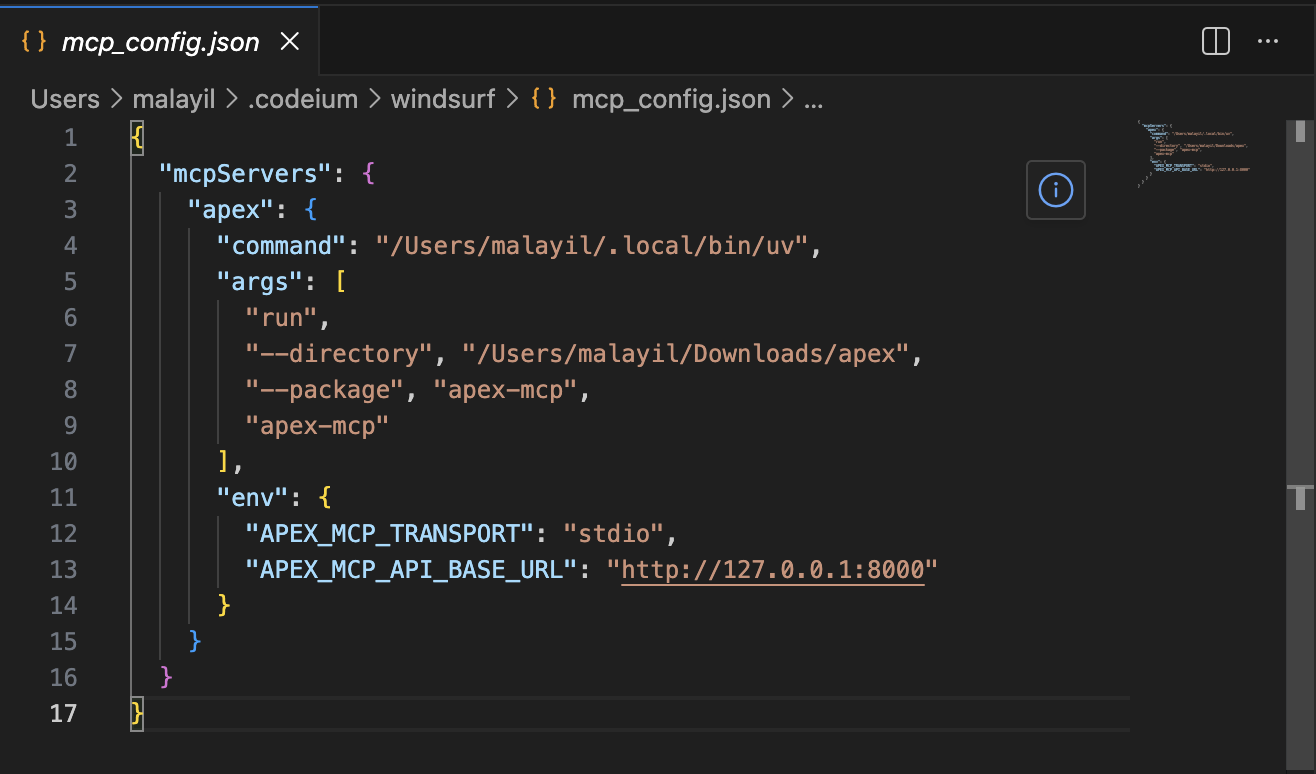
When apex login runs, it writes the access token to ~/.config/apex/mcp-access-token.json. The MCP server’s local auto-auth picks this up and forwards it to every API call. The API verifies the JWT, extracts the developer’s identity, enforces OPA.
The agent is not a separate principal. It acts as the developer. OPA applies the developer’s policies. The audit log records the developer’s identity. If the developer does not have permission to deploy to production, neither does the agent. This is the correct model — not because it is convenient, but because it is the only model where governance remains meaningful.
For shared or remote MCP deployments (multiple developers, a central MCP host), the local cache fallback can be disabled. In that mode, the agent must supply the token explicitly — either as a tool argument or via a request header. The API remains the trust boundary in both cases.
MCP Transport Options
apex’s MCP server supports two transport modes:
- stdio — the MCP server is spawned as a subprocess by the IDE. Standard in/out is the communication channel. This is the typical local development setup for Windsurf and Cursor.
- HTTP (streamable) — the MCP server runs as an HTTP service. This enables a shared, centrally hosted MCP server where multiple developers’ agents all point to the same apex MCP endpoint.
The HTTP mode is interesting for teams: run one MCP server, all agents in the org talk to it. Each agent passes its own bearer token. The API enforces individual identity. You get a shared tool surface with per-user governance.
Designing for LLM Context Budgets
ci_logs is the most considered MCP tool specifically because of the LLM context problem. A typical Jenkins build produces thousands of lines of output. Sending all of it to a model is wasteful and sometimes impossible.
The ci_logs tool supports:
keyword— filter lines containing this string (case-insensitive). An agent looking for failures passeskeyword="ERROR"orkeyword="FAILED".tail_lines— return only the last N lines. For a build that ran out of memory, the failure is almost always at the end.- Truncation with metadata — the response includes
truncated: true,chars_returned, and if applicable,next_startandmore_logs_available. The agent knows there is more and can request the next slice.
This is not just convenience. It is what makes the agentic loop reliable rather than flaky. An agent that gets a clean, targeted log slice is more likely to correctly diagnose the failure than one that gets a wall of text to search through.
Extensibility — The Full DevSecOps Loop, Made Agent-Native
The most important architectural property of apex is that adding a new domain is a well-defined operation that produces a consistent result. The pattern:
Add contracts → Add API router/service/integration/repository → Add CLI command → Add MCP tools
And when you follow this pattern, every new domain automatically inherits:
- OPA authorization — enforced at the API middleware layer, no domain-specific auth code needed
- Audit logging — recorded by the service layer
- Slack notifications — sent for significant events
- MCP tools — the domain’s operations are immediately available to AI agents
The governance infrastructure is free. You pay for it once in the platform design and get it on every domain.
Here is what a complete DevSecOps workflow looks like as apex domains, along with what each enables in the agentic model:
apex deploy — Kubernetes Deployments
apex deploy service my-service --env prod --version 1.4.2
apex deploy service my-service --env prod --version 1.4.2 --follow
Wraps ArgoCD Application sync or a direct Helm release upgrade via the Kubernetes API. Returns rollout status. --follow streams rollout progress — similar to how ci logs --follow works, but tracking Kubernetes rollout events and replica readiness.
OPA policy: deployment to production is gated to platform-ops role. Deployment to dev/staging is open to all developers. The agent inherits whichever permissions the developer has.
The agentic loop closes: after ci_build returns success, the agent calls deploy_service. After the deploy, the agent calls logs_tail to verify the service started cleanly. The entire CI→CD→Observe cycle can run autonomously.
apex logs — Service Log Access
apex logs tail my-service --env prod --since 1h --keyword ERROR
Wraps the Kubernetes API (kubectl logs semantics), Loki, or CloudWatch — whichever your environment uses. The same keyword filter and tail_lines reduction pattern from ci_logs applies here. The MCP tool logs_tail gives agents a clean interface to observe running services.
The agent scenario: after a deploy, the agent calls logs_tail with keyword="ERROR" and tail_lines=50. If there are startup errors, the agent surfaces them immediately. If the service is clean, the agent reports success.
apex clusters — Rancher Cluster Management
apex clusters list
apex clusters describe my-cluster
apex clusters scale my-cluster --nodes 5
Wraps the Rancher API for multi-cluster visibility and node pool management. Read operations (list, describe) are open to all developers. Mutating operations (scale, provision) are policy-gated to platform-ops.
The MCP tool clusters_describe gives an agent structured cluster state as context for infrastructure reasoning. An agent asked “why is the deploy slow?” can call clusters_describe to check if the cluster is under-resourced before suggesting a fix.
apex secrets — Secrets Management
apex secrets get db-password --env prod
Wraps HashiCorp Vault or AWS Secrets Manager. The design decision here: apex never stores secrets. It fetches on demand, forwards to the caller, and records every access in the audit log.
For MCP exposure, the scope is deliberately limited. An agent can read secrets scoped to its current build or deploy context — not arbitrary secrets across environments. OPA enforces this boundary. The audit log records every access with identity, secret name, environment, and timestamp.
apex aws assume — AWS Role Access
apex aws assume --account prod-123456789 --role deploy-role
Wraps AWS STS AssumeRole. Returns short-lived credentials (access key, secret, session token). OPA controls which user/role combinations can assume which AWS accounts and roles. The audit log records every assume-role event.
This is the right model for teams managing multiple AWS accounts: instead of distributing long-lived credentials or managing complex IAM trust policies per-developer, apex acts as the policy-enforced gateway. Developers authenticate to apex, and the OPA policy determines what AWS access they can request.
apex connect — EC2 and SFTP Access
apex connect ec2 my-instance --env prod
apex connect sftp my-server --env prod
Wraps AWS Systems Manager Session Manager for EC2 — no SSH key distribution, no open inbound ports. Or wraps a policy-enforced SFTP gateway. Every session is audited: who connected, to which instance or server, in which environment, at what time.
The governance value here is significant: instead of SSH keys floating around, access is brokered through apex. OPA decides who can reach which environments. The audit trail is automatic.
Software Patterns Worth Calling Out
Layered API Architecture
The API enforces a strict layering:
| Layer | Owns | Does Not |
|---|---|---|
routers/ | HTTP request/response mapping, status codes | Business logic, DB access |
services/ | Use-case orchestration, business rules | HTTP concerns, DB queries |
integrations/ | External system protocols (Jenkins, OPA, Slack, IdP) | Business logic, HTTP status |
repositories/ | Persistence (audit store) | Business logic, external calls |
This is not just organizational preference — it makes each layer independently testable and replaceable. The Jenkins integration can be swapped for a different CI provider without touching the CI service. The audit repository can swap from Postgres to a different store without touching the service layer.
Shared Contracts
Contracts are the single source of truth for the interface between components. API, CLI, and MCP tool responses all use the same schema definitions from packages/contracts. When a field is added, all three surfaces pick it up. When a field is removed, type checking catches it everywhere simultaneously.
Protocol-Backed Caching
The /v1/ci/jobs endpoint has a configurable TTL cache. The cache is implemented behind a Python protocol/ABC at the service layer. The in-use implementation is in-memory. A future Redis-backed cache would implement the same protocol. Swapping backends requires no changes to the service or any other layer — just a different concrete implementation injected at startup.
This is the right way to make caching pluggable: define the interface at the service boundary, not in the infrastructure code.
Vendor-Neutral Observability
OpenTelemetry instrumentation throughout the API. In any deployment, you point the same collector configuration at Jaeger, Grafana Tempo, Datadog, Honeycomb, or any other OTel-compatible backend. The application code does not change.
Stable CLI Exit Codes
0  — command succeeded
1  — general CLI failure (validation, generic error)
2  — authentication/session failure (login required, token error)
3  — network failure (connectivity, timeout, DNS)
4  — API/server failure (non-auth HTTP error response)
5  — unexpected failure (unhandled exception)
Scripts and CI pipelines can branch on these. if [ $? -eq 2 ]; then apex login; fi is reliable. This is the kind of detail that separates a CLI that is pleasant to automate from one that is frustrating.
--output human|json|yaml
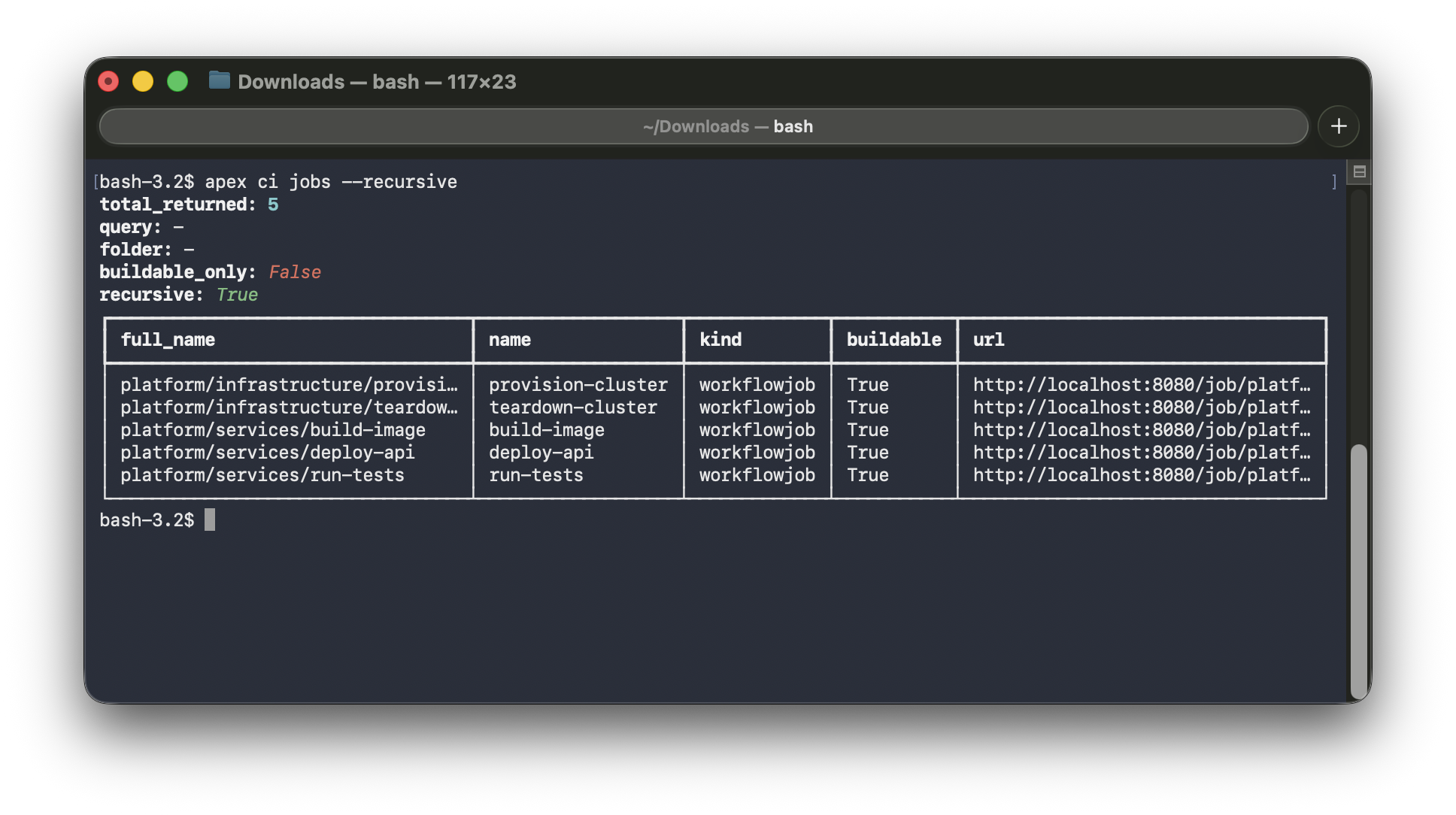
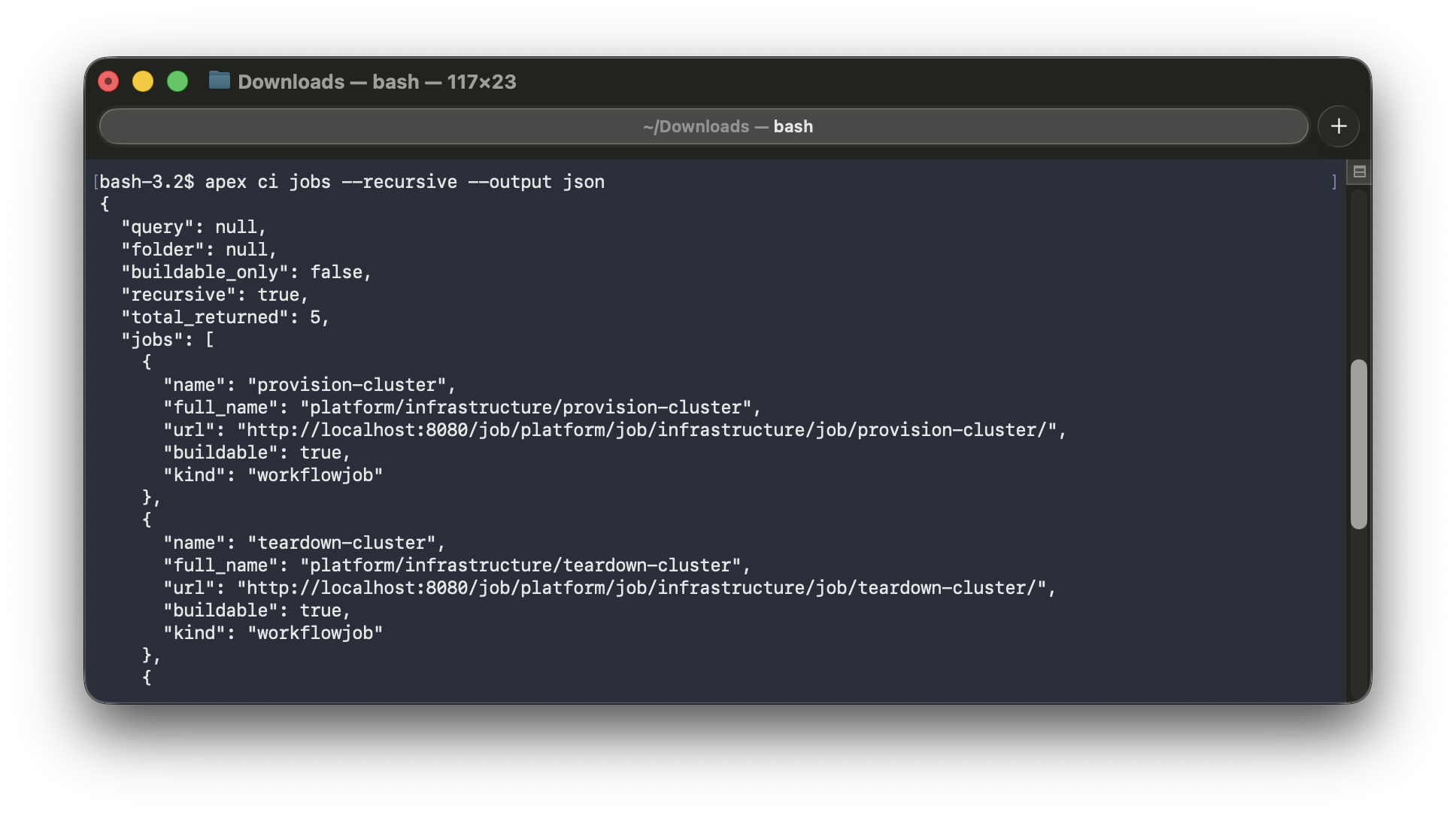
Every apex command supports three output modes. human is the default — formatted tables and messages for reading. json and yaml are for consumption by scripts, pipelines, and other tools. The same command, the same API call, three different renderers. The output flag is accepted both globally (apex --output json ci jobs) and on subcommands (apex ci jobs --output json) — whichever is more natural in context.
apex ci jobs (human) | apex ci jobs --output json |
|---|---|
 |  |
--debug Mode
Default error output is concise and user-facing:
Error: CI operation failed
Status: 502
Detail: Jenkins unavailable at http://localhost:8080
Hint: Check that your Jenkins instance is running and APEX_JENKINS_BASE_URL is correct
With --debug:
Error: CI operation failed
Status: 502
...full Python traceback...
Production-friendly by default. Full diagnostics on demand. This is the right model for a CLI that will be used both interactively and in automation.
MCP Is Not a Special Case
The MCP server is architecturally just another API client. It resolves auth, builds a request, calls the API, and returns the response shaped for MCP’s tool protocol. It did not require a new authorization model. It did not require special API routes. It inherited everything by going through the same API that the CLI uses.
This is the composability payoff of the architecture: new client surfaces are cheap to add because all the hard work (auth, authz, audit) happens in one place.
A Word on the Makefile
There is something quietly wonderful about a Makefile. In a world of custom task runners, package scripts, and CLI wrappers that come and go, make has been doing the same job since 1976 — and it still does it better than most.
apex uses a Makefile at the repo root for all day-to-day operations: starting the local stack, running the API and MCP server, linting, running tests, and more. No documentation needed — make help prints everything, cleanly.
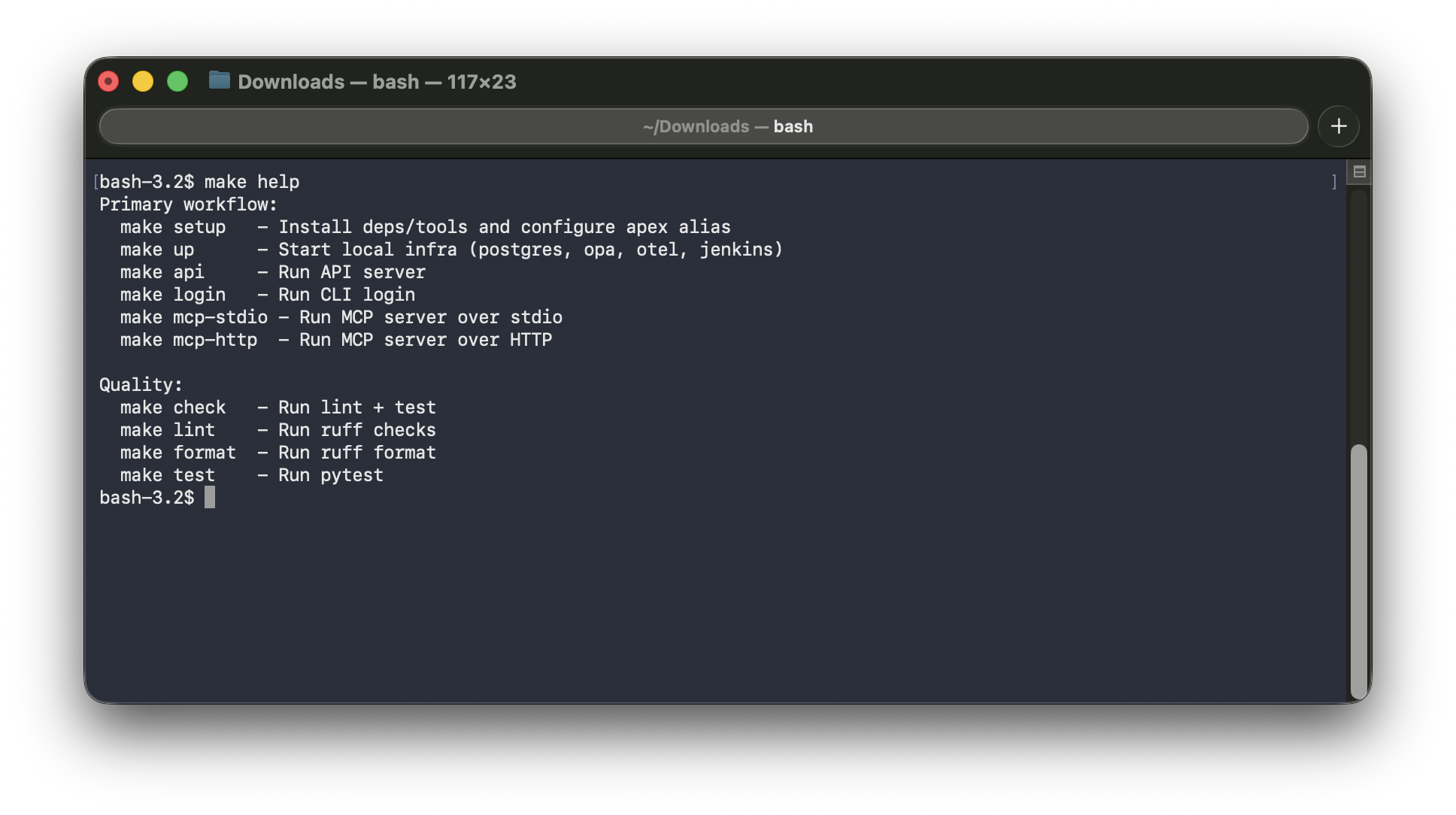
It is a small thing. But there is a reason make keeps showing up in serious projects across every language and decade. It is discoverable, portable, and does exactly what you tell it to do. Worth appreciating.
Closing Thoughts
What does “production-grade” mean on a hobby project?
It means the decisions are honest, not shortcuts. It means auth is real (OIDC, JWKS, token verification), not a dummy header check. It means authorization is policy-as-code (OPA), not a hardcoded role comparison. It means the layering is enforced, not aspirational. It means error responses are structured and actionable, not raw stack traces sent to the caller.
None of this required a team. It required deciding, early, what the invariants were — and sticking to them.
The most interesting thing apex represents, to me, is not the CI integration. It is what a platform looks like when you treat humans and AI agents as equal first-class clients from the start. The MCP server is not a feature bolted on at the end. It is a client surface that exists because the API was designed to be consumed cleanly, by anything.
Every tool a developer uses daily is a candidate domain: build, deploy, logs, clusters, secrets, AWS access, remote connections. If you can wrap it behind an API with OPA, audit, and an MCP interface, both the developer and their agent can use it — with the same identity, the same governance, and the same guarantees.
The ideas here are real regardless of scale. Build your platform like it matters. Because even at hobby scale, the decisions you make are the ones that teach you what good design actually feels like.